Feed in your documents, PDFs, or data from external APIs — then ask questions in natural language. The AI searches your knowledge base semantically and answers based on what it finds, with sources. A separate admin chat lets you manage the knowledge base through conversation: ingest content, list, inspect, and delete entries — all without leaving the chat.
Business Impact
Challenge
Employees waste time searching through documents, manuals, internal wikis, and scattered systems to find answers buried in unstructured content
Solution
Enterprise knowledge from documents and APIs is embedded into a searchable knowledge base; an AI assistant retrieves relevant passages and answers questions in real time
Outcome
Instant, grounded answers from your own knowledge sources — no more manual searching or outdated tribal knowledge
What It Does
Knowledge Ingestion — Feed in PDFs, documents, or data from external APIs. Content is automatically processed and stored in a searchable knowledge base — upload via API or directly through the admin chat.
Batch Processing — Ingest multiple sources at once. The system processes each document individually and returns per-item status reports.
Semantic Search — Ask a question, get the most relevant passages from your knowledge base — ranked by relevance and filterable by metadata.
Knowledge Chat — An AI assistant that searches your knowledge base autonomously. It decides when to search, what to look for, and can refine its queries multiple times before delivering an answer. Available through a built-in UI or via API for integration into existing systems.
Knowledge Base Administration — A separate admin chat lets you manage everything through conversation: add content, search, list entries, inspect details, and delete — all in natural language.
How It Works
Vector Database with @operaide/vector — aktorVektorDatabase initializes a AgentDB-backed vector store. The same database client is shared across all five Reaktors — embedding, retrieval, chat, admin, and batch processing all read from and write to the same store.
Embedding Pipeline — aktorVektorEmbeddingPipeline handles the full ingestion flow: content parsing (e.g. PDF via @operaide/document), text chunking with configurable overlap, embedding generation (OpenAI text-embedding-3-small by default), and batch storage. A custom aktorBase64ToFile converts uploaded base64 data URLs into proper File objects before they enter the pipeline.
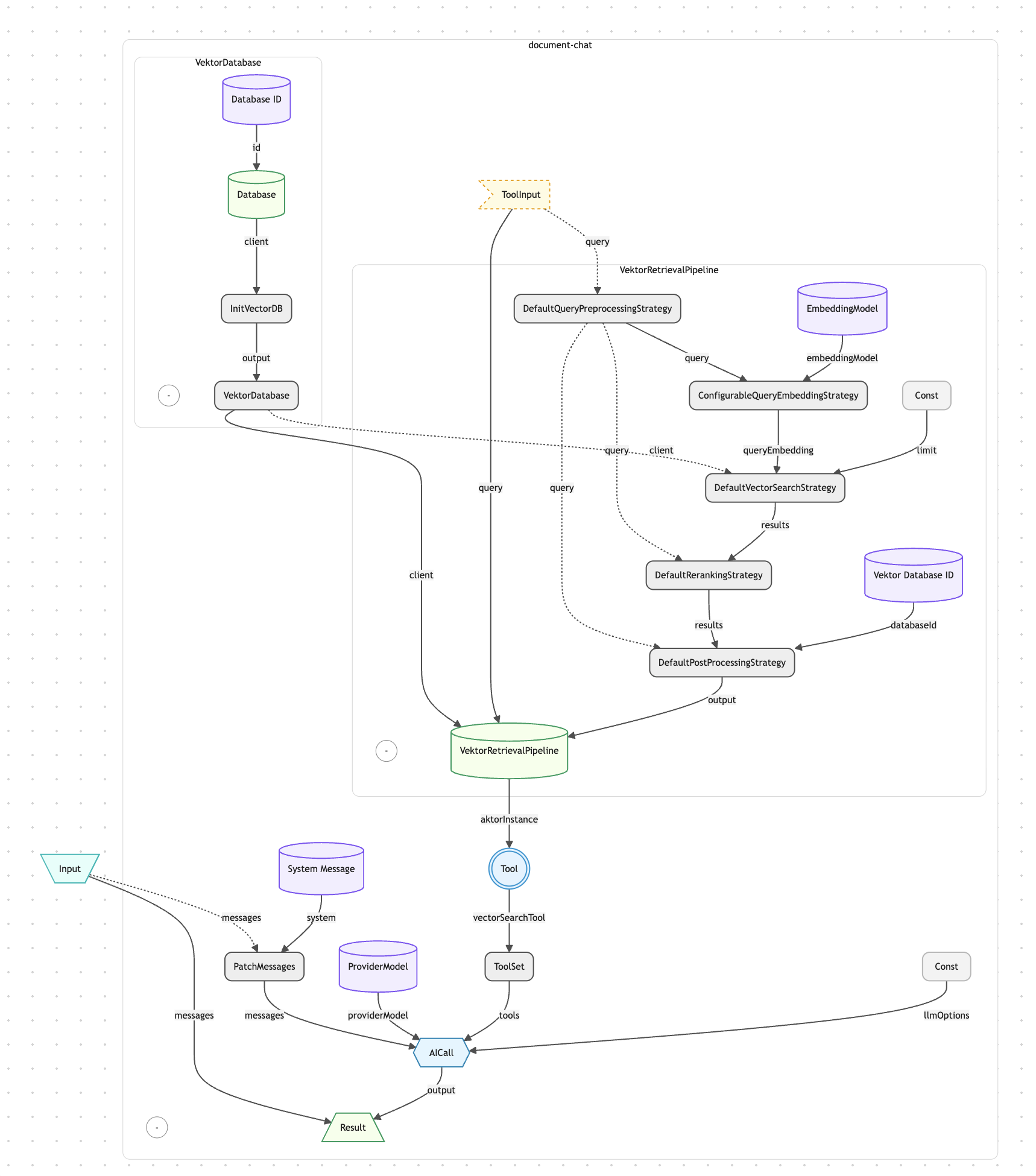
Retrieval as a Tool — aktorToTool wraps aktorVektorRetrievalPipeline into an AI-callable tool with a Zod-validated parameter schema. The database client is injected as a dependency — invisible to the AI, which only sees the query parameter. This pattern cleanly separates what the AI controls from what the system provides.
Multi-Step Tool Orchestration — aktorAICall is configured with max_steps: 5, allowing the AI to call tools multiple times per turn. It can search, review results, refine its query, and search again before generating a final response.
Stream Processing for Batch Uploads — aktorForEachStream creates a stream from an array of files, aktorVar holds the current file, and aktorStreamProcessor runs the embedding pipeline for each item. This pattern enables efficient multi-file processing without loading all files into memory simultaneously.
Composable Toolsets — Individual tools are created with aktorToTool, grouped with aktorToolSet, and merged with aktorCombineToolSets. The admin chat combines a file management toolset with a search/upload toolset into a single unified set the AI can use.
Reaktor Architecture
The Knowledge Chat system is composed of five Reaktors sharing a single vector database. The embedding Reaktor and its batch variant handle content ingestion — input enters aktorBase64ToFile, flows through aktorVektorEmbeddingPipeline (parsing, chunking, embedding, storage), and returns processing stats. The retrieval Reaktor exposes aktorVektorRetrievalPipeline directly for programmatic semantic search. The knowledge-chat Reaktor wraps the retrieval pipeline as a tool via aktorToTool and hands it to aktorAICall with max_steps: 5 — the AI decides autonomously when and how to search. The admin Reaktor is the most complex: it extracts files from chat messages with aktorFilesFromLastMessageAsFiles, sets up a stream processor for batch embedding, creates five tools (process, search, list, inspect, delete), merges them with aktorCombineToolSets, and gives the AI full knowledge base management capabilities through conversation.
Document Chat Reaktor Architecture (1 of 5 Reaktors)
Why Operaide
Ready to Ship AI
That Works?
See how Operaide helps teams ship reliable AI applications faster. From prototype to production—with complete control and European sovereignty.