Customer Requests Resolved Faster

Contributors

Ferris Kleier
Software Developer

Michael Scharf
Cief Architect
Estimated Implementation Time
3-4 hours
Key Libraries Used
  • @operaide/ai
  • @operaide/aktor
  • @operaide/database
  • @operaide/mail
  • zod
LLM Providers & Models
  • Azure GPT-4o-mini
  • Configurable via settings
External Services
  • Mailgun
TAGS
Multi-Agent
Enterprise Automation
Email & Messaging

Introduction

Customer email comes in, four AI agents analyze it in parallel — classification, contract lookup, rule matching, and a full case summary with recommendations. The result is stored and immediately available to your support team through an intelligent chat interface. From email to actionable case file in seconds, without human intervention.

Business Impact

Challenge

Support staff spend significant time reading emails, looking up policies, and compiling case summaries before they can even begin helping a customer

Solution

Parallel AI agents handle classification, contract lookup, rule retrieval, and summarization automatically — delivering a ready-to-act case file within seconds

Outcome

First response time drops from hours to seconds; human agents spend their time resolving cases, not preparing them

What It Does

  • Automated Email Intake — Incoming support emails are picked up automatically. Customers receive an immediate acknowledgment with a unique case ID — no manual triage needed.
  • Parallel Agent Analysis — Four AI agents work simultaneously: one classifies the request, one retrieves contract details, one looks up applicable rules, and a fourth assembles the full picture. All within seconds.
  • Ready-to-Act Case Files — Every case arrives fully prepared — classification, contract context, relevant policies, and a summary with recommended next steps. Support staff can start resolving immediately.
  • Searchable Case History — Every processed case is stored automatically, building a searchable history over time. Spot patterns, track recurring issues, and review past resolutions.
  • Support Agent Chat — Your team gets an AI-powered chat with full knowledge of all cases. Ask about a specific case, query trends, or get recommendations for handling a follow-up.

How It Works

  • Mail Reaktor Registration — Uses registerMailReaktorDefinition to create an email-triggered workflow. Incoming emails are automatically parsed into subject, body, sender, and message ID.
  • Agent Encapsulation with defineAktor — Each AI agent is defined as a reusable defineAktor subgraph that encapsulates its own prompt template, message construction, and AI call. This makes agents independently testable and configurable.
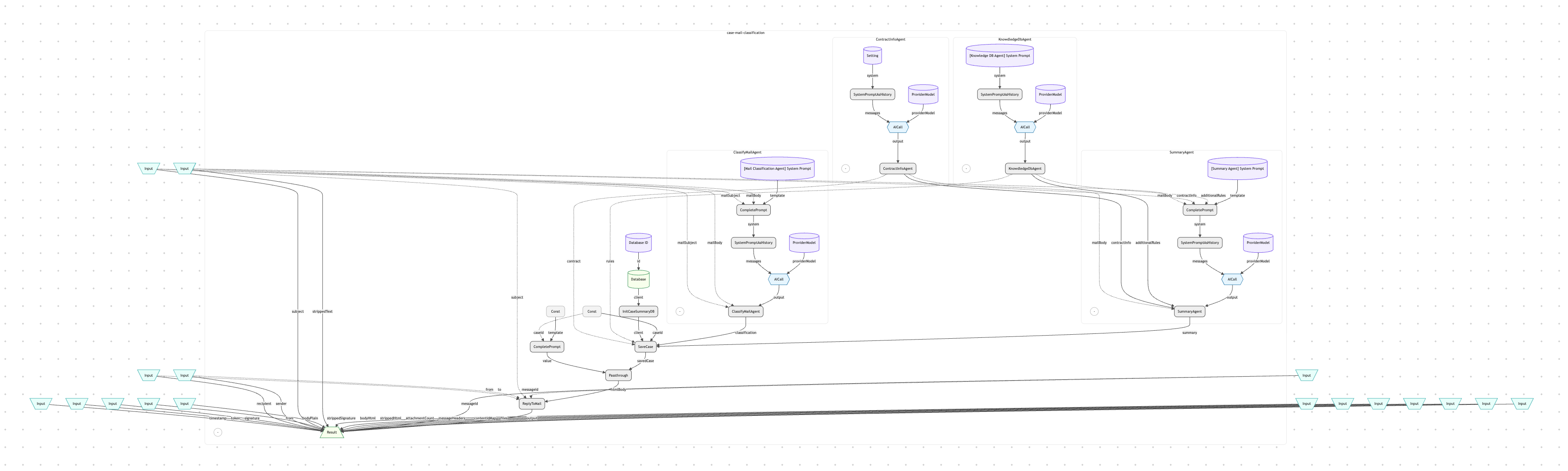
  • Automatic Parallel Execution — The Reaktor framework analyzes data dependencies in the Aktor graph. Agents 1, 2, and 3 have no shared inputs, so they execute in parallel. Agent 4 depends on Agents 2 and 3, so it waits automatically — no manual orchestration code needed.
  • Template-Based Prompting — All agent prompts use aktorCompletePrompt with {{variable}} placeholders, filled at runtime with actual email content and agent outputs. Prompts are exposed as aktorSetting values, so non-developers can customize agent behavior through the UI.
  • Cross-Reaktor State via Database — The Mail Extraction Reaktor writes cases; the Support Chat Reaktor reads them. Both share the same AgentDB instance configured via a deployment setting — no direct coupling between Reaktors.
  • Dependency Management with aktorPassthrough — Ensures the database write completes before the reply email is sent, even though the write isn't in the direct return path of the Aktor graph.

Reaktor Architecture

The Multi-Agent Support system consists of two Reaktors that share an AgentDB. The Mail Extraction Reaktor is the core of the system: when an email arrives, it constructs an Aktor graph where four AI agents form the analysis layer. The framework's lazy evaluation engine detects that three of the four agents are independent and runs them in parallel. The Summary Agent's inputs depend on the Contract and Knowledge agents, so it waits for their results automatically. After all agents complete, the case is persisted to the database and a templated auto-reply is sent to the customer. The Support Chat Reaktor is simpler — it loads all cases from the shared database, injects them into a system prompt via aktorCompletePrompt, and provides a chat interface powered by aktorAICall where human agents can query case data conversationally.

Multi-Agent Reaktor Architecture
Why Operaide

Ready to Ship AI

That Works?

See how Operaide helps teams ship reliable AI applications faster. From prototype to production—with complete control and European sovereignty.


More Than Chat. The AI-Native Enterprise

Browse our repository of AI applications built with Operaide. All available in the Operaide platform’s app store as templates for you to get a headstart when implementing your custom AI solutions.